

WhatsApp users are now facing a dangerous new scam called WhatsApp GhostPairing, a method that allows attackers to access accounts without passwords or traditional hacking tricks. This attack misuses WhatsApp’s Linked Devices feature, giving criminals a quiet way to spy on conversations while the account owner remains unaware.
Once a hacker connects their device, they can read private chats, view shared media, pretend to be the user, and carry out fraud. The most alarming part is that the victim usually stays logged in and receives no obvious security warnings, making the breach extremely hard to notice.
Security researchers warn that this threat targets human trust, not weak encryption. That is why awareness is now the strongest form of protection.
What Is WhatsApp GhostPairing and Why It’s Dangerous
GhostPairing is a scam where attackers secretly link their own device to your WhatsApp account. The Linked Devices feature is designed for convenience, but scammers exploit it to gain silent access.
Unlike account takeovers where users get locked out, GhostPairing keeps everything looking normal. Messages still arrive, calls work, and nothing feels broken. Meanwhile, someone else is watching every conversation in real time.
This creates a serious privacy risk, especially for users who rely on WhatsApp for work, business, or sensitive communication.
How GhostPairing Is Different From Other WhatsApp Scams
Traditional attacks like SIM swapping involve mobile networks. OTP scams rely on stealing verification codes. GhostPairing avoids both.
Instead, attackers trick users into approving a device connection themselves. Because no SIM or OTP theft occurs, many people do not realize anything is wrong until real damage is done.
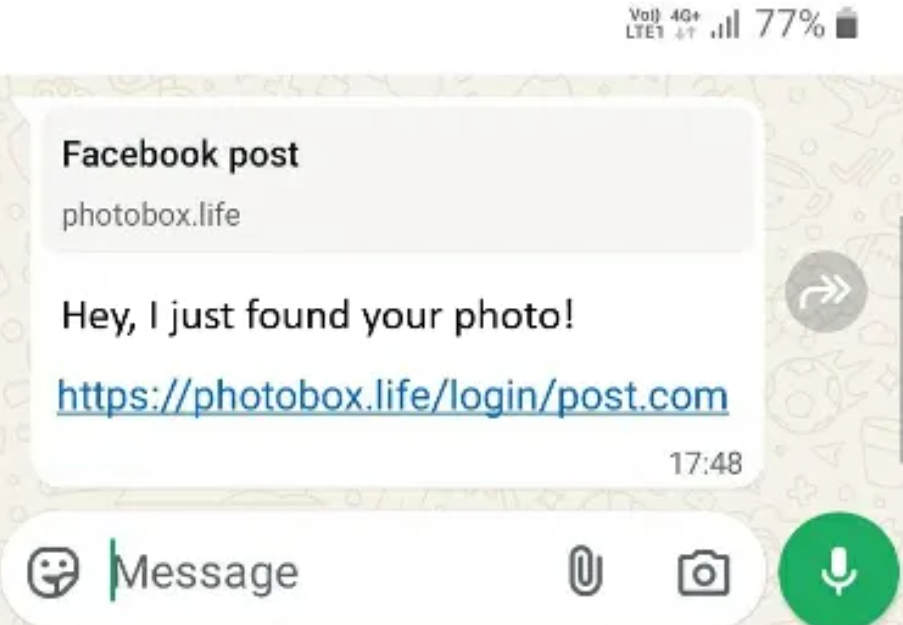
The scam often starts with a message from a familiar contact whose account has already been compromised. The message feels casual and urgent, often pointing to a link that claims to show a photo, post, or important update.
Clicking the link opens a fake page that looks official. The page asks for phone number verification. When the number is entered, attackers trigger WhatsApp’s device linking process and generate a pairing request.
If the victim approves the request, the attacker’s device becomes permanently linked to the account.
Fake Links, QR Codes, and Verification Traps
Many victims fall for fake social media links or WhatsApp QR code prompts that appear genuine. Others unknowingly enter numeric verification codes shown on scam pages.
The design looks familiar, which lowers suspicion and increases the success rate of the attack.
Why WhatsApp Accounts Are Vulnerable to GhostPairing
WhatsApp designed device linking to be fast and simple. That simplicity is exactly what attackers exploit.
Most users are used to tapping through prompts without reading them carefully. Scammers rely on urgency, distraction, and trust to push victims into making one wrong tap.
What Hackers Can Do After Accessing Your WhatsApp
Once their device is linked, attackers can read messages as they arrive, download shared photos and videos, and impersonate the user.
This often leads to financial scams, identity misuse, blackmail, and fraud. Since messages appear to come from a trusted contact, friends and family are more likely to fall for follow-up scams.
In business cases, a single compromised account can damage reputation and trust overnight.
Warning Signs Your WhatsApp Account May Be GhostPaired
The signs are usually subtle. Messages may appear read even when you did not open them. Syncing may feel slow or inconsistent. Notifications may behave strangely.
The clearest indicator is finding an unknown device listed under Linked Devices in WhatsApp settings.
Who Is Most at Risk From This Attack
Journalists, freelancers, influencers, and small business owners are prime targets. They respond quickly to messages and deal with many contacts daily.
Users who rely heavily on WhatsApp for work and communication are more likely to approve pairing requests without thinking twice.
How to Check and Remove Unknown Linked Devices
Open WhatsApp settings and go to Linked Devices. Review every connected device carefully. If you see anything unfamiliar, remove it immediately.
This instantly cuts off the attacker’s access.
After removal, monitor your account closely and watch for any new pairing requests.
How to Protect Your WhatsApp From GhostPairing
Simple habits go a long way. Avoid clicking suspicious links, even if they come from known contacts. Always question unexpected verification prompts.
Enable two-step verification to add an extra layer of protection. Most importantly, slow down and read pairing messages carefully before approving anything.
What WhatsApp Says About the Threat
WhatsApp maintains that end-to-end encryption still protects messages during transmission. However, encryption cannot prevent misuse once a device is legitimately linked.
The platform advises users to regularly review linked devices and stay alert. Experts agree that clearer warnings during pairing could prevent many attacks.
Final Thoughts: Secure Your WhatsApp Before It’s Too Late
The WhatsApp GhostPairing scam proves that hackers no longer force entry. They wait for permission.
One careless approval can expose your private life, your contacts, and your reputation. Checking linked devices takes seconds but can save weeks of stress.
Your privacy is still in your hands. Protect it before someone else quietly takes control.
FAQs
1.Can someone access my WhatsApp without my phone?
Yes. Attacks like GhostPairing allow access without physical contact with your device.
2.What can scammers do with my WhatsApp account?
They can read messages, view media, impersonate you, and carry out fraud.
3.How do I know if my WhatsApp is compromised?
Look for unknown linked devices, strange message activity, or unexplained syncing issues.
4.Are locked chats safe from GhostPairing?
Locked chats are encrypted, but linked devices can still access content indirectly.
5.How can I stop someone from spying on my WhatsApp?
Check Linked Devices regularly, remove unknown connections, and enable two-step verification.